




Not sure how to change the mobile number linked to your Emirates ID? You are not alone. Many UAE residents face this issue when they change SIM cards, lose access to an old number, or stop receiving OTPs from government portals, banks, or service providers.
Your Emirates ID record is connected with important UAE services. If your registered mobile number is outdated, you may miss OTPs, government alerts, visa updates, banking notifications, and other important messages.
In this guide, we explain how to change mobile number in Emirates ID through ICP Smart Services and the UAEICP app. We also cover the fee, documents, common mistakes, rejection reasons, and what to do if you cannot access your old number.
In a Hurry? Quick Steps to Change Mobile Number in Emirates ID
Here is the short version:
- Visit the ICP Smart Services website or open the UAEICP app.
- Log in using UAE Pass or your ICP account.
- Search for the Data Update or Update Personal Information service.
- Enter or confirm your Emirates ID, passport, residency, and contact details.
- Add your new UAE mobile number.
- Verify the new number through OTP.
- Review the application carefully.
- Pay the service fee shown on the portal.
- Submit the request and save the reference number.
- Track the application status if needed.
The official ICP Data Update service is used to update non-essential data such as phone number and address. ICP’s official service page lists a smart service fee of AED 50, but the final payable amount should always be checked on the live ICP portal before submission.
Why Updating Mobile Number in Emirates ID Is Important
Your Emirates ID is not only an identity card. It is connected with many daily services in the UAE, including government portals, UAE Pass, visa services, banks, telecom services, health services, schools, employers, and business-related platforms.
If the mobile number linked to your Emirates ID is old, inactive, or not yours, you may face problems such as:
- Not receiving OTPs
- Difficulty logging in to government portals
- Missing visa, residency, or Emirates ID alerts
- Banking notification problems
- Delays in service approvals
- Difficulty verifying your identity online
- Missed reminders from authorities or institutions
- Problems using UAE Pass-linked services
The UAE official portal also states that Emirates ID holders must report any change in personal details to ICP within one month from the date of change. That is why it is better to update your mobile number as soon as possible.irates ID data, including mobile numbers accurate and up to date. The process to update mobile number is quick and can be done entirely online or through the UAEICP app.
How to Change Mobile Number in Emirates ID Online Through ICP
The main official way to update your Emirates ID mobile number is through ICP Smart Services. ICP stands for the Federal Authority for Identity, Citizenship, Customs & Port Security.
ICP provides a Data Update service for updating non-essential data such as phone number and address. The service can be accessed through the ICP Smart Services website or the UAEICP app.
Step 1: Visit ICP Smart Services
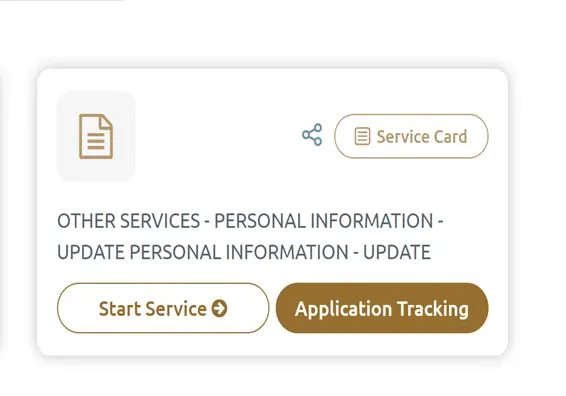
Go to the official ICP Smart Services website. Log in using UAE Pass or your ICP account.
Step 2: Search for Data Update
Look for the Data Update or Update Personal Information service. This service is used to update non-essential information such as mobile number and address.
Step 3: Enter Your Personal Details
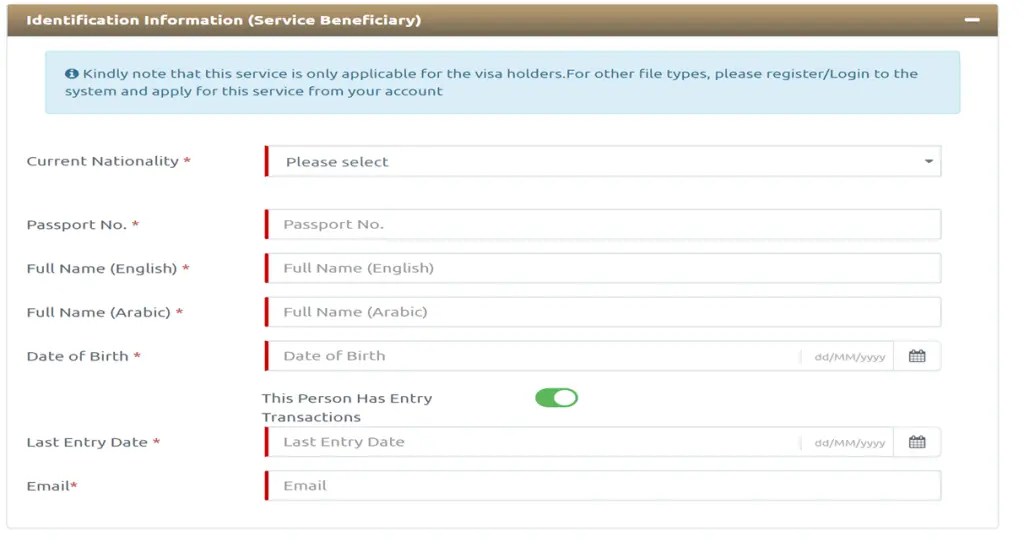
You may need to confirm or enter details such as:
- Emirates ID number
- Passport number
- Nationality
- Date of birth
- Residency or visa file details
- Email address
- Current mobile number, if shown
Make sure all details match your official documents.
Step 4: Enter the New Mobile Number
Add your new UAE mobile number in the mobile number update field. The number should be active because you may receive an OTP for verification.
Step 5: Verify OTP
Enter the OTP sent to your new mobile number. If the OTP does not arrive, check the number again and make sure the SIM is active.
Step 6: Review the Application
Before payment, review all information carefully. A wrong passport number, Emirates ID number, date of birth, or mobile number can delay or reject the request.
Step 7: Pay the Fee
Pay the fee shown on the ICP portal. ICP’s official Data Update service page lists AED 50 as the smart service fee, but the final amount may vary depending on live portal charges or payment-related fees.
Step 8: Save the Reference Number
After submission, save your application number or reference number. You can use it to track the request if needed.
How to Change Emirates ID Mobile Number Through UAEICP App
You can also update your registered mobile number through the UAEICP app. The UAEICP app allows residents, visitors, and citizens to access ICP services related to visas, residencies, Emirates ID, fines, and other services.
Steps to Update Mobile Number Through UAEICP App
- Download or open the UAEICP app.
- Log in using UAE Pass or your ICP account.
- Go to public information, personal information, or Data Update services.
- Select the option to update personal information.
- Enter your Emirates ID, passport, residency, and contact details where required.
- Add your new UAE mobile number.
- Verify the number through OTP.
- Review the application.
- Pay the fee shown in the app.
- Submit the request and save the reference number.
The app is useful if you prefer completing the process from your phone. However, make sure you are using the official UAEICP app and not a third-party app or unknown website.
Documents and Details Required to Change Mobile Number
For most online mobile number update requests, the ICP system may retrieve your details digitally. However, keep these details ready before starting:
- Emirates ID number
- Passport number
- Passport expiry date
- Nationality
- Date of birth
- Visa or residency file number, if required
- Active UAE mobile number
- Email address
- UAE Pass login access
- Old mobile number, if still available
ICP’s official Data Update service page says there are no required documents listed for this service. However, if your record cannot be verified automatically, the portal may ask for additional details or direct you to another service channel.
How Much Does It Cost to Change Mobile Number in Emirates ID?
ICP’s official Data Update service page lists the smart service fee as AED 50. However, you should always check the final payable amount on the live ICP portal or UAEICP app before submitting the request.
Avoid writing a fixed total such as AED 53, AED 60, or AED 150 unless it is shown on the official portal at the time of application.
Also, do not confuse the Data Update service with residency permit data amendment or Emirates ID replacement services. Those are different services and may have different fees.
Data Update vs Residency Permit Data Amendment
Changing your mobile number is usually handled through ICP’s Data Update service. This service is for non-essential data such as phone number and address.
However, if you need to update information displayed on your Emirates ID or residency permit, that may fall under a different service, such as amendment of residency permit data or replacement of Emirates ID card.
For example, ICP’s amendment of residency permit data service has different requirements, fees, and processing time. It may involve Emirates ID, passport, personal photo, and other documents depending on the change.
So, if you only need to update your mobile number, use the Data Update route. If you need to change your name, profession, nationality, passport details, or displayed card information, check the relevant ICP amendment service.
When Should You Update Your Emirates ID Mobile Number?
You should update your Emirates ID mobile number as soon as your old number becomes inactive, lost, cancelled, transferred to someone else, or no longer accessible.
You should also update it if:
- You changed your UAE SIM card
- Your old mobile number is no longer active
- OTPs are going to someone else
- You cannot log in to UAE Pass or government portals
- Your bank or service provider says the registered number does not match
- Your residency or Emirates ID services are delayed due to contact mismatch
The UAE official portal states that Emirates ID holders must report any change in personal details to ICP within one month from the date of change.
Important Points to Remember
- Use only the official ICP Smart Services website or UAEICP app.
- The mobile number should be an active UAE number.
- Keep UAE Pass access ready.
- Make sure your Emirates ID, passport, and residency details are correct.
- Save the application reference number after submission.
- Do not share OTPs with anyone.
- Do not enter your Emirates ID or passport details on unknown websites.
- If your request is rejected, check the reason and correct the details before applying again.
- If the issue is urgent, contact ICP support or visit an authorised ICP customer happiness centre.
What Happens If You Do Not Update Your Emirates ID Mobile Number?
If your Emirates ID mobile number is outdated, you may face several practical problems.
1. OTP Problems
Many UAE services send OTPs to the mobile number linked to your Emirates ID or UAE Pass. If you do not have access to that number, you may not be able to log in or complete transactions.
2. Government Service Delays
Visa, residency, Emirates ID, immigration, and government portal updates may be delayed if your contact details are wrong.
3. Banking and Financial Alerts
Banks may send transaction alerts, payment reminders, security warnings, and verification messages to your registered number. Missing these messages can create financial and security risks.
4. UAE Pass Access Issues
If your UAE Pass verification is linked to an old number, you may face login or authentication problems.
5. Missed Notifications
You may miss alerts from schools, employers, healthcare providers, telecom companies, and other institutions.
6. Compliance Issues
Emirates ID holders are expected to keep their personal details updated. Delaying the update can create problems when using official services.
Why Your Mobile Number Update May Be Rejected
Your Emirates ID mobile number update may be rejected or delayed if:
- The Emirates ID number is entered incorrectly
- Passport details do not match the ICP record
- Residency file details are wrong
- Date of birth or nationality is incorrect
- The mobile number is not active
- The OTP is not verified
- UAE Pass login does not match the applicant
- The wrong service was selected
- Your visa or Emirates ID record needs correction first
- The application was not completed within the required time
Before submitting again, read the rejection reason carefully and correct the issue.
What If You Cannot Access Your Old Mobile Number?
If you cannot access your old number, you may still be able to update your mobile number through ICP Smart Services or the UAEICP app, depending on your login access and verification options.
Try these steps:
- Log in using UAE Pass.
- Use the Data Update service.
- Enter the new active UAE mobile number.
- Complete OTP verification on the new number.
- Submit the request and track the result.
If you cannot log in, cannot verify your identity, or the system keeps sending OTPs to the old number, contact ICP support or visit an authorised ICP service centre for assistance.
Conclusion
Changing the mobile number linked to your Emirates ID is important because it affects OTPs, UAE Pass access, government services, visa updates, bank alerts, and other official notifications.
The correct official route is usually ICP’s Data Update service through ICP Smart Services or the UAEICP app. Keep your Emirates ID, passport details, UAE Pass access, and new UAE mobile number ready before starting.
Bestax does not provide Emirates ID mobile number change services. This guide is only for general information. To update your mobile number, use the official ICP website, UAEICP app, ICP support, or an authorised ICP service centre.
FAQs about How to Change Mobile Number in Emirates ID
How do I change my mobile number in Emirates ID?
You can change your mobile number through ICP Smart Services or the UAEICP app by using the Data Update or Update Personal Information service. Log in, enter your details, add the new UAE mobile number, verify OTP, pay the fee, and submit the request.
What is the official service for changing mobile number in Emirates ID?
The relevant ICP service is usually called Data Update. ICP describes it as a service for updating non-essential data such as phone number and address.
How much does it cost to change mobile number in Emirates ID?
ICP’s official Data Update service page lists AED 50 as the smart service fee. The final payable amount should always be checked on the live ICP portal or UAEICP app before submission.
Can I change Emirates ID mobile number through UAEICP app?
Yes. You can use the UAEICP app to access ICP services and update personal information, including your mobile number, if the service is available for your profile.
Do I need UAE Pass to update my mobile number?
ICP’s official Data Update service page states that the service requires login using UAE Pass. Keep your UAE Pass access ready before starting the process.
Can I use a non-UAE mobile number?
Usually, you should use an active UAE mobile number because the service depends on OTP verification and UAE service communication.
How long does it take to update the mobile number?
The ICP Data Update page says the data is updated in the systems automatically after the required steps and fee payment. However, timing may vary depending on the application, verification, and system status.
What documents are needed to update mobile number in Emirates ID?
ICP’s Data Update service page lists no required documents for the service. Still, keep your Emirates ID, passport, residency details, UAE Pass, and active UAE mobile number ready.
What if my mobile number update is rejected?
Check the rejection reason. Common causes include wrong Emirates ID number, passport mismatch, wrong residency file details, inactive mobile number, failed OTP verification, or using the wrong service.
Can Bestax change my Emirates ID mobile number?
No. Bestax does not provide Emirates ID mobile number change services. To update your number, use ICP Smart Services, the UAEICP app, ICP support, or an authorised ICP service centre.
Disclaimer: This article is provided by Bestax Chartered Accountants for general information purpose only. Bestax itself is an accounting & taxation consultancy firm. We do not offer any service to change the mobile number. To change your number or data in your Emirate ID, visit ICP Website or Smart Services ICP.

With over six years of experience in tax, accounting, bookkeeping, and business setup processes, Neha Ghauri provides expert insights through meticulously researched content.
Learn More About Neha